Same model, different results: choosing an open-weight inference provider
What to check before selecting a provider for open-weight models: serving quality, prompt caching, reliability, and other gotchas.
This post was co-authored by me and AI.
All editorial direction is my own, and I’ve extensively edited and revised.
There’s more to the LLM market than OpenAI and Anthropic. Developers including DeepSeek and Alibaba’s Qwen team release open-weight models. Their weights—the numerical values learned during training that comprise the model—are available for others to download and run, subject to their licences.
You don’t have to run these models yourself. Providers such as DeepInfra, Together AI, and Baseten host them and sell API access priced by input and output tokens. You’ll see this called serverless inference or model-as-a-service. Usually, you’re choosing access to a provider’s catalogue, not just one model.
For a company giving employees access to open-weight models, the attraction is more model choice, potentially lower costs, and a choice of hosts. They can also enable use cases that Anthropic’s or OpenAI’s ever-increasing guardrails restrict, such as security work.
Having the weights means a service shutdown or sudden policy change doesn’t have to end your use case. A provider can retire an endpoint, but it can’t take away the model weights you’ve downloaded. You can move the same model to another host or run it on your own infrastructure.
But access to the same model isn’t necessarily the same service. Quality, features, speed, and cost can vary considerably. Here’s what I’d check before committing.
The model name isn’t a quality guarantee
A provider doesn’t simply load a model and put a billing system in front of it. Serving involves software, formatting, numerical precision, and configuration choices. Those choices can affect whether the model answers well, calls tools correctly, or produces the structured output tools expect.
This is still a fast-moving, bleeding-edge ecosystem. New models can introduce new requirements for formatting messages, handling reasoning, and calling tools. Providers race to make them available, while the serving software and integrations are still catching up. Getting a model online can happen faster than finding and fixing all the implementation problems—even at a major provider.
Good providers fix these problems, however. Simon Willison documented Azure’s GPT-OSS-120B AIME maths benchmark median rising from 80% to 93.3% in August 2025. An Azure engineer identified the fault: older serving software ignored the requested reasoning-effort setting. OpenRouter’s August–September comparison also shows GPT-OSS-120B benchmark improvements at several providers over the following weeks.
Catalogue size and launch speed are easy to advertise. Consistently serving every model well takes more work. I’d rather have a provider get the models my team uses right than boast about how many it offers.
A familiar cloud brand isn’t a guarantee, either. Artificial Analysis’s July 2026 evaluation placed Google Vertex’s GPT-OSS-120B service well below its reference implementation. I’ve also encountered problems myself: when I tested GPT-OSS-20B on AWS Bedrock a few months ago, structured output didn’t reliably conform to the requested JSON schema—the defined structure it was supposed to enforce. Don’t assume a feature works correctly just because it’s offered.
One factor is quantization: representing the model’s numbers with fewer bits to reduce memory and computing requirements. Well-implemented 8-bit weight quantization is generally a low-risk choice. More aggressive compression can noticeably reduce quality, particularly on some long-context tasks. A study of quantization and long-context performance found small average losses at 8-bit, but much larger losses in some 4-bit cases.
Rather than treating the bit count as a cutoff, focus on the results. Quality lost through aggressive quantization can show up as lower benchmark scores or more tool-call errors—the same measures you can use to assess serving quality more broadly.
OpenRouter publishes both measures by provider, making it a useful place to compare how well different hosts serve the same model. It routes requests to multiple inference providers, and its provider comparisons show substantial differences between them.
When the model’s developer also serves it, use that endpoint as a reference: the lab should know how its model is intended to run. For GLM 5.3 Flash, that’s Z.ai.
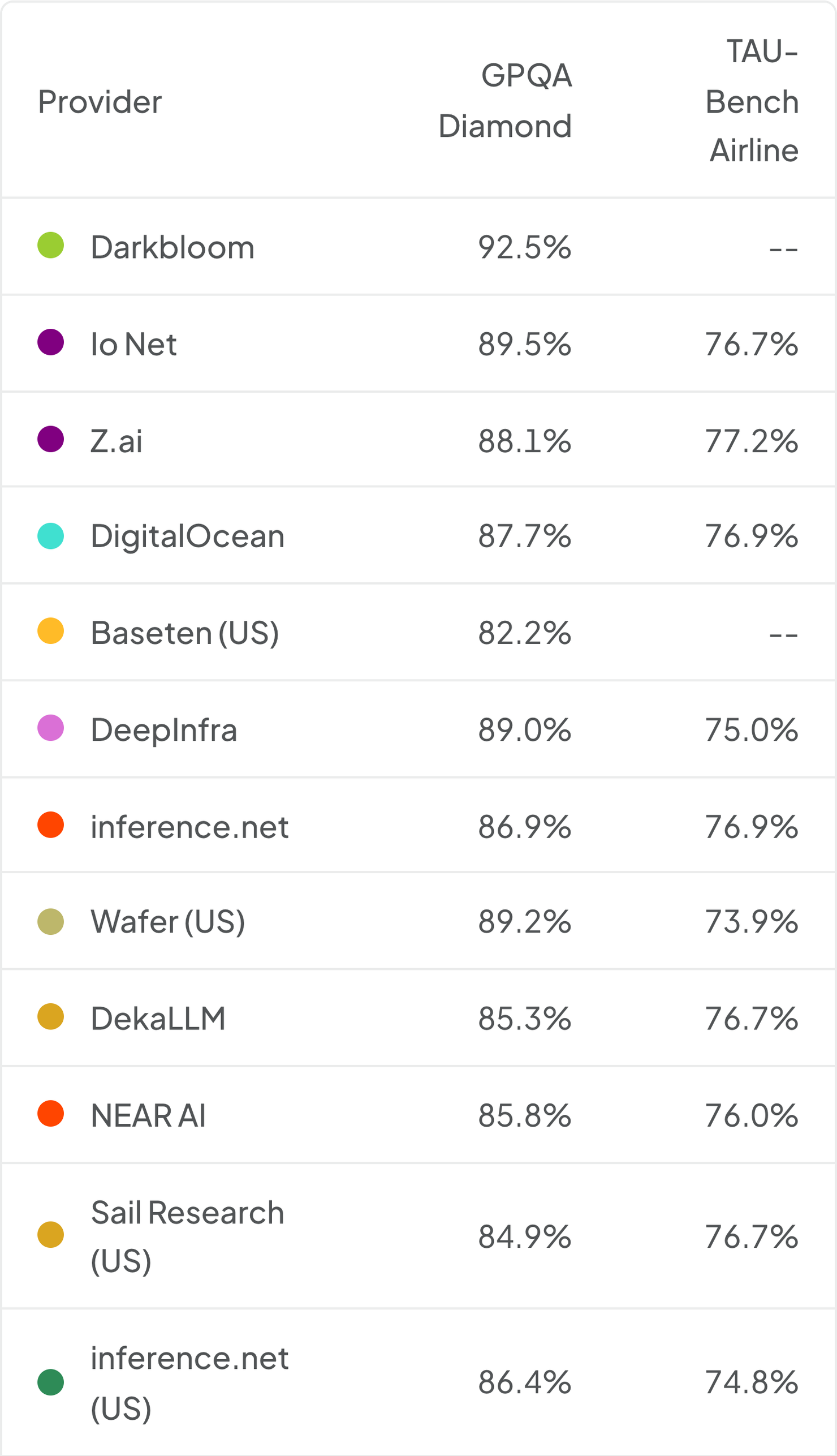
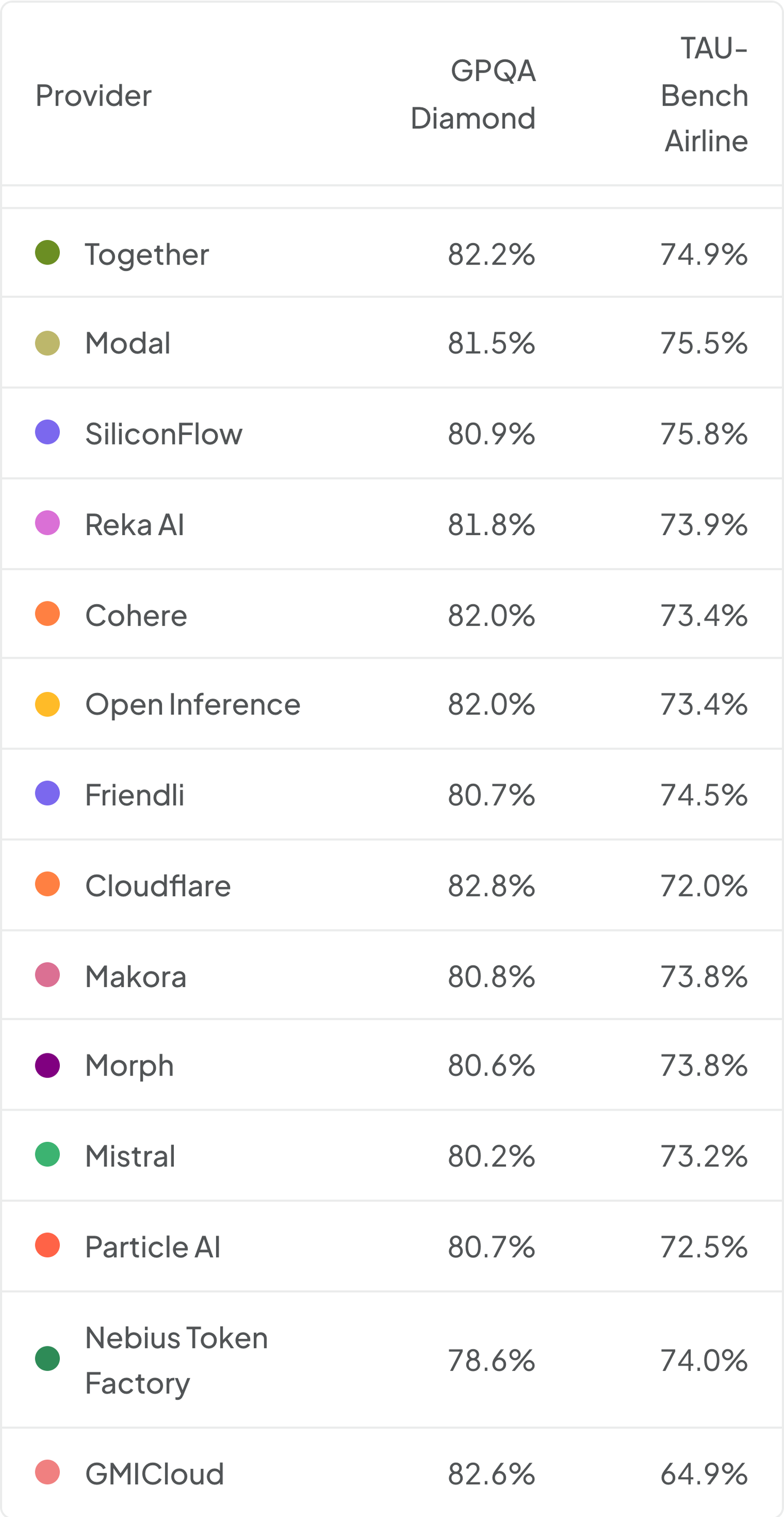
GPQA measures how well a model answers graduate-level science questions. TAU-Bench Airline measures whether it can complete customer-service tasks using tools over a conversation. Nebius Token Factory scores 78.6% on GPQA against Darkbloom’s 92.5%—a substantial gap for the same model. On TAU-Bench Airline, GMICloud scores 64.9% against Z.ai’s 77.2%. These comparisons help identify providers delivering noticeably weaker results.
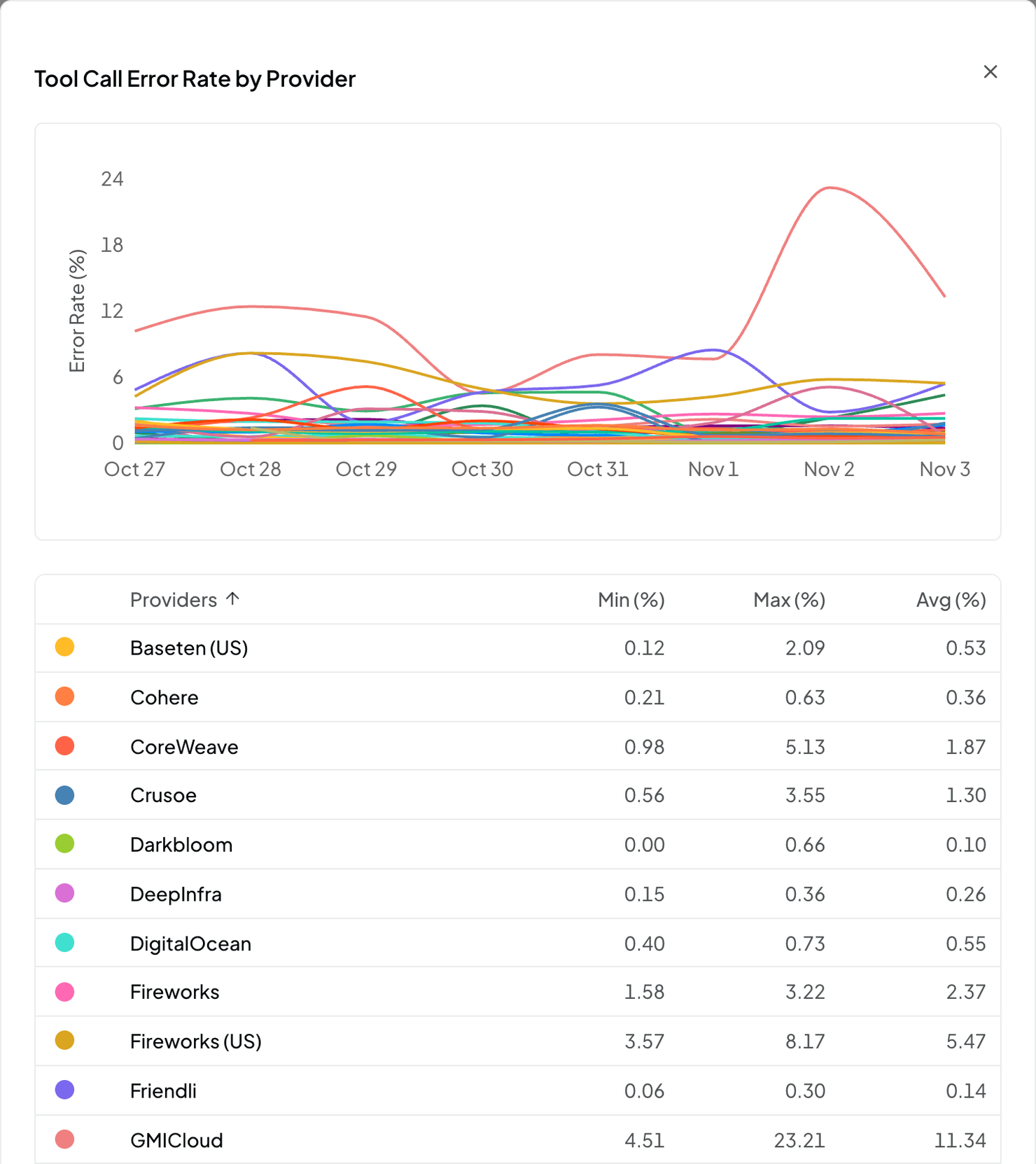
Tool-call error rates show an even sharper contrast: GMICloud’s displayed average is 11.34%, compared with DeepInfra’s 0.26% for the same model. Those invalid calls are errors your agent has to handle.
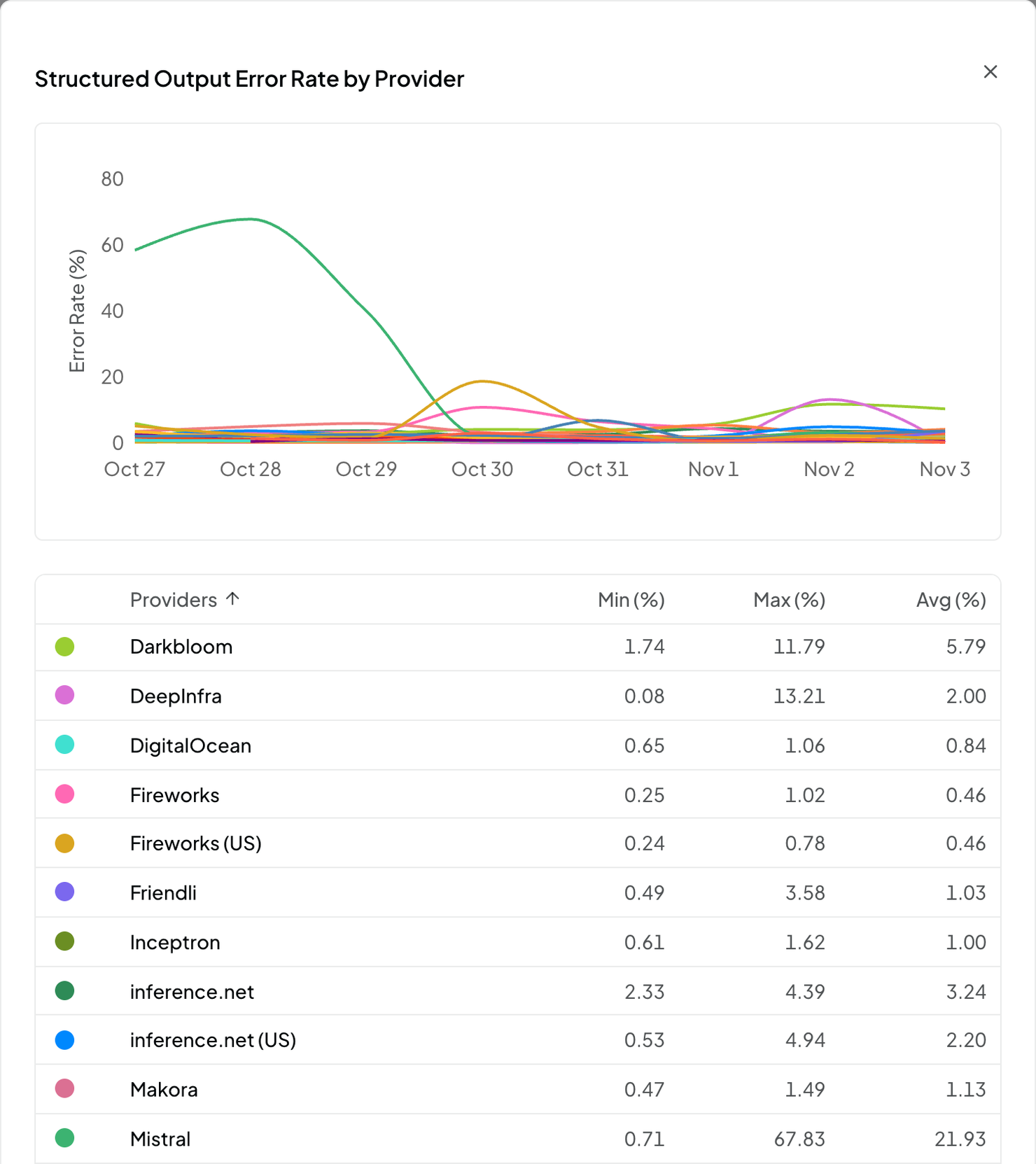
Structured output is the option for output conformance to a JSON schema, and serves as another check that can reveal problems. OpenRouter’s separate structured-output error chart shows another wide spread, with displayed daily-rate averages of 0.46% for Fireworks and 21.93% for Mistral.
Use OpenRouter’s comparisons to help build your shortlist, then test the providers with your own workloads. Its results describe access through OpenRouter, not necessarily what you’ll get through a direct account with the same provider.
Artificial Analysis is another useful source. For selected models, it benchmarks individual providers on tool calling, reasoning, and long-context tasks against a self-hosted reference. Its GPT-OSS-120B endpoint accuracy comparison is the source of the Google example above: Google’s index is about 72 against a reference of 100. That’s a relative benchmark index, not the percentage of answers it got right. Its DeepSeek V4.1 Flash 1017 comparison covers speed, latency, pricing, and caching, but doesn’t yet include provider accuracy results.
Check compatibility beyond basic chat
The OpenAI Chat Completions API is the de facto standard for open-weight inference. A coding agent doesn’t need built-in support for every provider. Support for this API and a configurable endpoint is usually enough to connect. But “OpenAI-compatible” doesn’t mean every detail works identically.
Providers differ in the API fields and settings used to enable thinking, request structured output, and control other model behaviour. One coding agent harness may handle these differences correctly while another doesn’t—even though basic chat works in both.
Reasoning preservation is a particularly important example. Reasoning models generate a separate stream of working before their final answer. Some, including Kimi K3, expect it back in later requests. Dropping it can cause repeated work and worse results.
Some APIs carry that text in a field named reasoning; others use reasoning_content. If a coding agent doesn’t handle these differences correctly, reasoning can appear on screen yet never reach the model’s next turn. I’ve had to add client-side workarounds for exactly this problem. The provider’s chat template—which formats messages for the model—can also mistakenly strip reasoning that the agent sends correctly.
A quick check, in a coding agent where you can display reasoning: ask it to choose and remember a number within a large range, without revealing it in its final answer or using tools to save it. Confirm the number appears in its reasoning, then ask for it on the next turn. Repeated failures are a warning sign for a model that’s supposed to preserve reasoning. A failure flags a problem somewhere between the agent and the model; it doesn’t identify which component is responsible.
Built-in support for a provider should handle its API quirks and variations for you. It’s worth checking what your coding agents support beyond a generic connection.
Compare the cost and speed of whole sessions
For coding agents, prompt caching is critical to cost efficiency. Requests repeatedly send conversation history, instructions, and tool definitions. Caching reuses earlier computation instead of processing that input again. I’d treat it as a requirement for sustained coding-agent use: paying full price for repeated input can make long sessions dramatically more expensive.
First, check whether the provider offers it for the models you intend to use. Support isn’t universal, even within one provider’s catalogue. Where supported, prompt caching on open-weight inference APIs is usually automatic.
Check the provider’s caching behaviour:
- How long does cached input remain available between requests?
- Can routing between servers cause misses?
- What discount applies, and can you see cached-token usage in responses or billing?
The details matter. Groq’s caching documentation, for example, specifies supported models and expiry after two idle hours. A typical pricing example is GLM 5.3 Flash on Together: $0.03 per million cached input tokens versus $0.15 uncached—an 80% discount.
In long coding sessions, later requests can have 98–99% of their input served from cache. At an 80% cached-input discount, a 98% cache hit rate cuts input charges by 78.4%.
Speed and reliability matter too. Ask for historical uptime and error rates, along with typical speeds for the models you plan to use. Look for performance under normal load, not just advertised peaks, and check the rate limits your team would share.
I’d compare providers by cost and time per completed task across your workflows. Lower token prices don’t necessarily offset the cost of people’s time spent waiting.
Bring the tools your workflow needs
A model API isn’t the whole coding agent. If you’re moving from bundled products, don’t assume web search and other hosted services come with the replacement inference provider.
Claude Code supports third-party inference, but features such as web search depend on the connection path. Local file editing and shell commands don’t depend on those hosted services.
Some inference providers handle services such as web search for you. Baseten Hosted Tools, for example, offers server-side web search without separate search-provider credentials. Alternatively, services such as Exa and Brave connect to compatible agents through integrations such as MCP, a protocol for connecting tools to AI applications.
Account for search and page retrieval across your workflows. Include their costs and data handling in the comparison, rather than discovering the gap after rolling out access.
Check the catalogue and the service terms
Since you’re usually choosing access to a range of models, look beyond today’s favourite. How broad is the catalogue? How quickly are useful new releases added? Does caching or tool support vary across it? What happens when a model is updated or retired?
The business checks still apply: support, data residency, retention, and whether inputs are used for training. “Not used for training” doesn’t mean “not stored”, but zero data retention (ZDR) options are widely available. Check exceptions for logs, caches, and other features, and confirm that the terms apply to the service tier you’re actually buying.
Pay-per-token APIs aren’t the only option. Providers also sell reserved capacity and managed dedicated endpoints; you can also rent GPUs and operate the serving software yourself. Those arrangements can offer more control or predictable capacity, with different costs and responsibilities. They’re alternatives worth knowing about, but are more complicated and not suitable for all circumstances. Pay-per-token APIs are the right place to start for giving your team access.
Run a short trial before committing
You don’t need to reverse-engineer every serving stack. You do need to test more than whether an API key works.
Consider a short checklist for evaluation:
- Shortlist catalogues and terms. Choose providers offering the range of models and business conditions you need.
- Try representative work. Include the different coding agents and other tools in use, with multi-turn tasks across several likely models.
- Check capabilities. Include answer quality, tool calls, structured output, and reasoning history where required.
- Measure whole sessions. Record cached usage, elapsed time, failures, retries, and total cost, including replacement tools.
- Keep a small repeatable test set. Run it again when important models, applications, or provider configurations change.
One model working well doesn’t certify the entire catalogue. But a representative trial will tell you much more than the price list. Choose the provider that reliably delivers useful capabilities to your team—not simply the cheapest tokens or the most familiar name.